Graph and ablation
NeuronDump draws any model as a graph you can open up, from whole sections down to single attention heads. You can inspect every part, search inside the model, and pick parts to cut. For every cut it answers "what happens if I cut this?":
- Direct impact, instantly, for any model: how much smaller the file gets, what gets
disconnected, what depends on the part, whether llama.cpp still loads the result, and a
verdict:
safe,riskyorbreaks_model. - Simulated impact, with
--features trace: the cut model runs in memory next to the original, and you compare their answers, perplexity and per-layer predictions. Nothing is written to disk.
When you like the result, save the cut as a plan and slim writes a real, smaller GGUF.
How it works
- The graph is built from the file itself. NeuronDump reads the architecture metadata and
the tensor names (
blk.7.attn_q.weight,ffn_down,ssm_out, …), the same wayinspectdoes. Nothing is hard-coded per model. - Containment levels: Model → Sections → Layers → Blocks → Tensors.
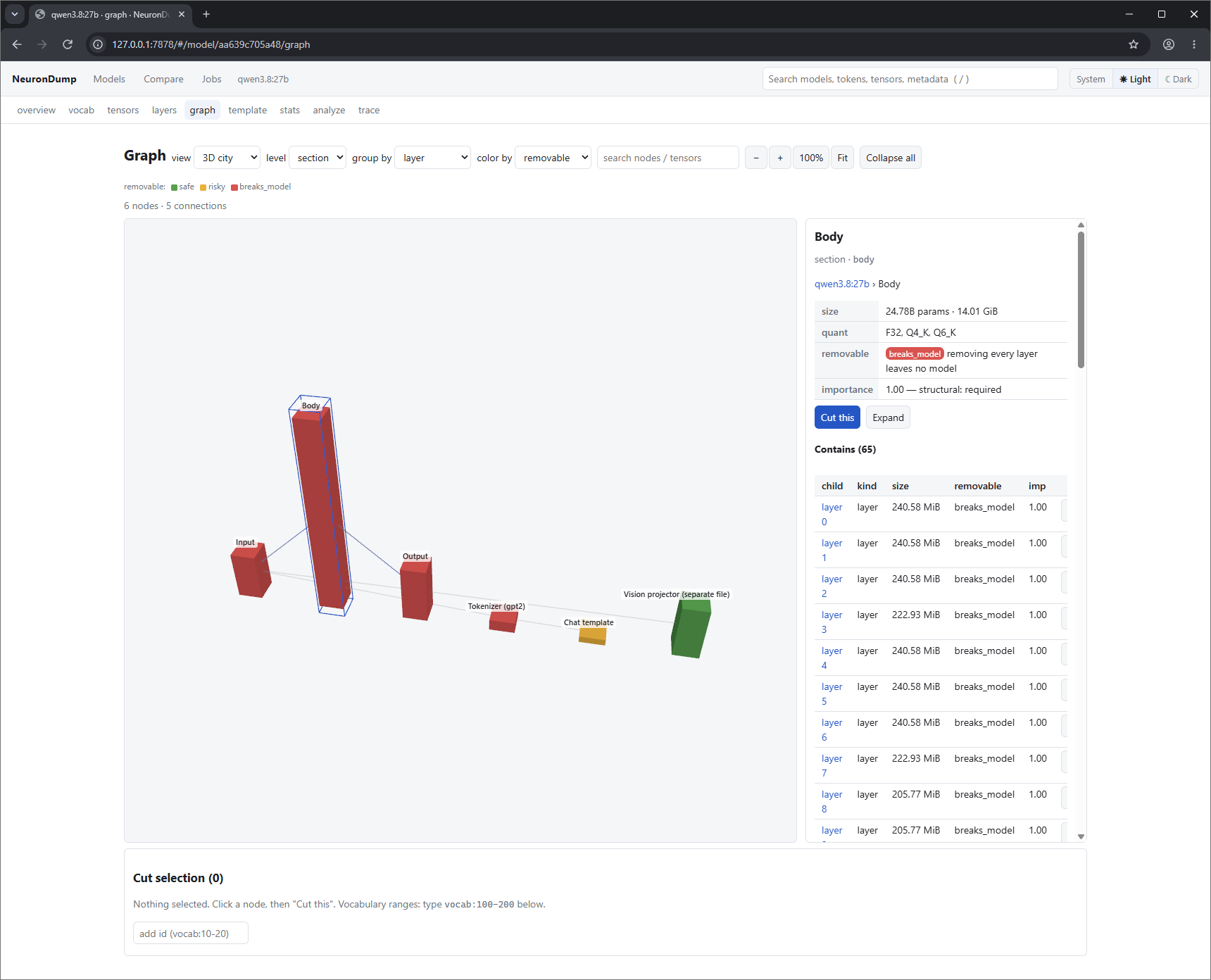
- Sections: Input, Body, Output, plus Tokenizer, Chat template, Vision projector and MTP head when present.
- Blocks: attention, SSM (linear attention, in hybrid models), feed-forward or MoE. Unknown tensors go in an "other" block.
- The fine level is built on demand. Attention heads (grouped by the KV head they share), feed-forward neurons (in buckets of 64 or more) and MoE experts are created only when you open their block. A layer would otherwise have thousands of nodes.
- Edges:
- dataflow: embeddings → every layer → output norm → output head, including the residual stream. Inside a layer: norm → attention → residual add → norm → feed-forward → residual add.
- tied: the output head reuses the embedding matrix.
- uses: the chat template uses special tokens, the tokenizer feeds the embeddings, and the projector feeds the input.
Edges are stored at the finest level. When you look at a coarser level, they are drawn between
the nearest visible parts, so a layer-level view shows layer 6 → layer 7.
5. Every part carries:
- its size in parameters and bytes, and its quantization types;
- what it contains;
- weight statistics (if you ran stats) and activations (if you ran trace);
- an importance score from 0 to 1, with its source (see below);
- a removable flag with a reason.
6. A cut is a remove or a zero.
- Removed: layers, tokens, the vision projector and the chat template leave the file, so
it gets smaller.
- Zeroed: blocks, heads, neuron buckets, experts and single tensors get their weights set
to 0 in place. Every shape stays the same, so llama.cpp still loads the file, but it is not
smaller.
7. Simulation uses masks, not a new file.
- A cut layer passes the residual stream through unchanged.
- A cut head or neuron outputs 0.
- Cut tokens can no longer be predicted.
The original and the cut model run on the same text, so the comparison is exact.
Importance comes from the best measurement available, in this order: 1. sweep: measured damage when the part is removed; 2. trace --corpus: how much each layer changes the hidden state; 3. stats: weight norms, for heads, neurons and experts; 4. structural: required parts = 1, edge layers = 0.9, everything else unmeasured.
In the web interface
Start neurondump web --open, pick a model, and open the graph tab.
Views and navigation
The view menu draws the same graph four ways. All of them use wamr3d (WebGPU, or WebGL 2 as a fallback), which is bundled with NeuronDump so the page works offline. A browser with neither shows an error instead of the graph.
| View | What you see | Mouse |
|---|---|---|
| 3D tower (default) | sections stacked bottom to top (Input, Body, Output, Tokenizer, Chat template); the layers are floors of the Body; slab size follows the bytes | drag to orbit, right-drag to pan, wheel to zoom |
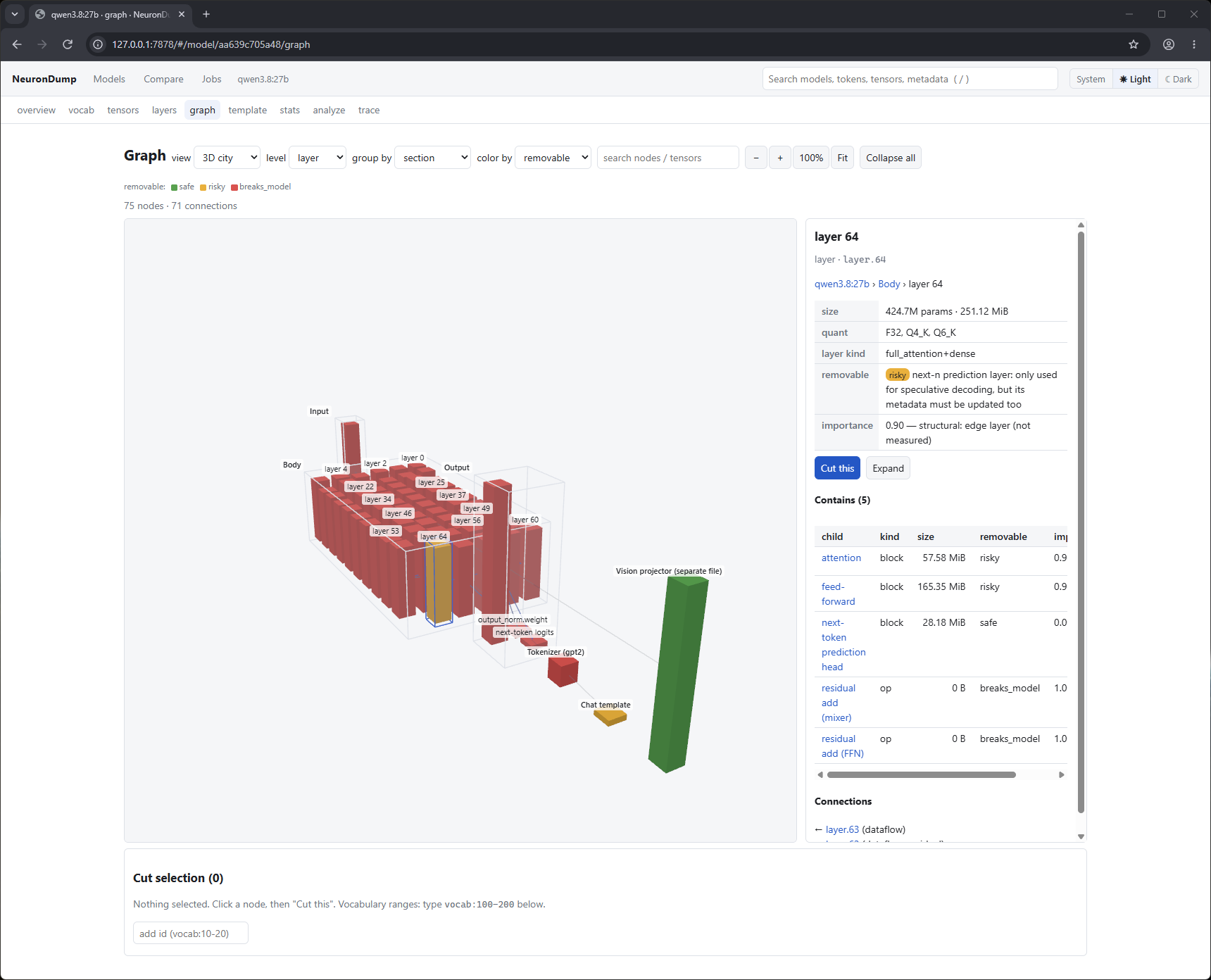
| 3D city | sections left to right; every part is a bar whose height follows its size | same as tower |
| 3D force | a force layout that follows the dataflow | same as tower |
| 2D | a flat diagram read top to bottom, seen straight on | drag to pan, wheel to zoom |
Above the canvas:
- − / +: zoom out / in. 100% shows the whole model, and Fit fits what is visible.
- level: how deep to draw: section, layer, block or tensor.
- group by: regroup the parts by section (the default), layer, block type (all attention
together), quantization type, layer kind (attention / SSM / MoE) or importance.
- color by:
- removable (green safe, amber risky, red breaks_model);
- section, layer kind, quantization or importance;
- damage after a sweep.
The view you pick is remembered. The page link can also force one: #/model/<id>/graph?view=2d.
Inspect a part
- Hover any part for a tooltip with its name, kind, parameters, bytes and removable flag.
- Click it to open the side panel. Containers (a section or a layer drawn as an outline) can be clicked too. The panel shows:
- the path: a clickable breadcrumb, for example
llama3.2:1b › Body › layer 7 › attention ›
    KV group 0 › head 3
; - size and quantization, and the layer kind (
full_attention+dense,linear_attention+dense, …); - removable, with the reason, for example "llama.cpp loads it after renumbering the layers";
- importance, with its source;
- weights: L2 norm, mean, std, zeros and outliers (once
statshas run); - activation: hidden-state size, how much the layer changes it, what the model would answer
at this layer, and per-head attention entropy (once
tracehas run); - info: dimensions, the number of heads and KV heads, the columns of
attn_outputthat belong to a head, and so on; - contains: every child with its size, flag and importance. Click a child to inspect it, or use the cut button in its row;
- connections: what flows in and what flows out, with clickable links.
Look inside a layer
Double-click a part (or press Expand in the side panel) to draw what is inside it, in place:
- A layer opens into its blocks: attention (or SSM), feed-forward (or MoE), and the two residual adds.
- An attention block opens into its tensors and its KV groups. For example, llama3.2:1b has 32 query heads sharing 8 KV heads, so 8 groups of 4.
- A KV group opens into its heads.
- A feed-forward block opens into neuron buckets (
neurons 0-63, …). A MoE block opens into its experts.
Expanded layers sit side by side as columns of their blocks. Double-click again (or press Collapse) to close a part, or Collapse all to go back. The level menu opens everything to the same depth at once; expanding one part keeps large models fast.
Search inside the model
Type in search nodes / tensors and press Enter:
- Visible matches: their parts are highlighted and the view zooms to them.
- Hidden matches: a match inside a closed layer (for example blk.3.ffn_down) opens its
parents, so the tensor appears and is highlighted.
Ids work as well as names (layer.7.attn.head.3, t.token_embd.weight).
The header search (press /) searches models, tokens, tensors and metadata everywhere.
Cut parts (edit the selection)
- Add a part:
- in the side panel, press Cut this;
- or press cut next to any child in the contains table;
- or type an id in the selection box: a node id, or a token range like
vocab:128000-128010. - Remove a part: press Uncut, or × next to it in the selection. clear empties the selection.
- What it looks like: cut parts get a dashed red outline. After a simulation they are greyed out.
- Mixed levels: you can cut parts at different levels together (a layer, a block, a few heads). A part inside something already cut is ignored, and the impact panel says so.
Direct impact
As soon as the selection changes, the panel under the graph shows the direct (static) impact, computed instantly and for any architecture:
risky · 60.8M removed + 0 zeroed (4.92%) · 1.23 GiB → 1.17 GiB
layer.7: risky (llama.cpp loads it after renumbering the layers; quality loss must be measured)
llama.cpp: loads the slimmed file
slim would remove layer(s) {7}; block_count 16 -> 15
It lists:
- size: parameters removed and zeroed, the share of the model, the new file size, and any
requantization a zeroed head needs (Q4_K blocks are 256 values wide, so cutting one 128-wide head
rewrites that tensor as Q8_0);
- the verdict (safe, risky, breaks_model) and why;
- what gets cut off: parts left without a path from the input to the output (for example,
everything after a cut output_norm);
- dependencies:
- tied embeddings (cutting token_embd also cuts the output head);
- tokens the chat template uses;
- bos/eos tokens;
- llama.cpp: whether the result still loads, and how the layers are renumbered;
- slim: what slim would do to the file;
- simulation: whether it is available for this architecture, and if not, why.
breaks_model cuts (the embeddings, the output head, a single layer of a hybrid model, every
layer) can only be simulated or saved with force ticked.
Hybrid models (qwen3.5, qwen3.8: three SSM layers, then one attention layer) can only lose
whole aligned groups of 4 layers. The impact panel shows risky for those and
breaks_model for anything else.
Simulate, sweep, save
- Simulate:
- Runs the selection in memory, with the prompt, the tokens to generate, and the corpus (prefilled with a few sentences).
- The result compares baseline and cut model: the top next tokens, KL divergence, greedy text, tokens/s, the logit lens per layer, and perplexity on the corpus.
- For llama3.2:1b, cutting layer 7 drops " Rome" from 0.84 to 0.61, and the cut model writes "Rome, but it's not the capital of Italy".
- Sweep this level (layers) and Sweep heads of layer N (in an attention block's panel):
- They cut each part in turn on the corpus and rank them by damage.
- The graph recolors by damage (red = essential), and a table lists every part.
- Save the N least damaging as a plan turns the result into a prune plan.
- Save as plan → Slim: shows the plan as the usual candidate table. Pick an output name and press Slim to write the GGUF and its Ollama Modelfile.
Simulate, sweep and slim run as jobs: they show progress, can be cancelled, and appear on the Jobs page.
On the command line
neurondump graph llama3.2:1b                        # sections and layers, as a tree
neurondump graph llama3.2:1b --level block          # blocks in every layer
neurondump graph llama3.2:1b --expand layer.7.attn  # inside one block: KV groups
neurondump graph llama3.2:1b --expand layer.7.attn.kv.1   # the 4 heads of KV group 1
neurondump graph llama3.2:1b --group-by importance
neurondump graph llama3.2:1b --format dot --out g.dot && dot -Tsvg g.dot -o g.svg
neurondump node llama3.2:1b layer.7.attn.head.3     # inspect one part
| Level | Shows |
|---|---|
section |
Input, Body, Output, Tokenizer, Chat template, and the vision projector / MTP head if present |
layer |
every layer, plus the input and output tensors |
block |
attention (or SSM), feed-forward or MoE, and the residual adds |
tensor |
every tensor |
fine |
every head, neuron bucket and expert (large: use --expand for one block) |
--format is tree, json, dot or mermaid. In the tree, ▸ marks a part that can be
expanded, and the id after # is what node, --expand and --cut take. Shorthands work:
L7, 7, blk.7, token_embd, blk.7.attn_q, and vocab:100-200 for tokens.
Direct impact
neurondump ablate llama3.2:1b --cut layer.7 --static
neurondump ablate llama3.2:1b --cut layer.7.attn,layer.9.attn.head.3 --static
neurondump ablate llama3.2:1b --cut token_embd --static          # refused: breaks_model
neurondump ablate llama3.2:1b --cut layer.7 --static --save-plan cut.json
It prints the same report as the web panel. --force allows breaks_model cuts, and
--save-plan writes the cut for slim.
Simulated impact
neurondump ablate llama3.2:1b --cut layer.7 --prompt "The capital of Italy is" --tokens 12
neurondump ablate llama3.2:1b --cut layer.15 --corpus texts.txt
Simulation uses the trace forward pass, so it supports the same architectures. It runs on the CPU without a KV cache, so tokens/s only compares the two runs.
Sweeps
neurondump sweep llama3.2:1b --corpus texts.txt --save-plan plan.json --top 2
neurondump sweep llama3.2:1b --level head --layer 7 --corpus texts.txt
neurondump slim llama3.2:1b --plan plan.json --out llama-14.gguf
A sweep removes each layer (or each head of one layer) in turn and ranks them by mean KL
divergence and perplexity on the corpus. That ranking becomes the importance in the graph, and
--save-plan writes the --top least damaging ones as a prune plan.
REPL
graph, node <id>, cut <id>..., uncut <id>|all, selection, impact, simulate [prompt],
sweep and plan save <file> work on the current model. Tab completes node ids; type layer.7.
to get its heads and neuron buckets.