Web interface
It prints a link like:
Open that link. The token is new at every start, and the page doesn't work without it. Everything (including the 3D engine) is embedded in the binary, so the page works offline.
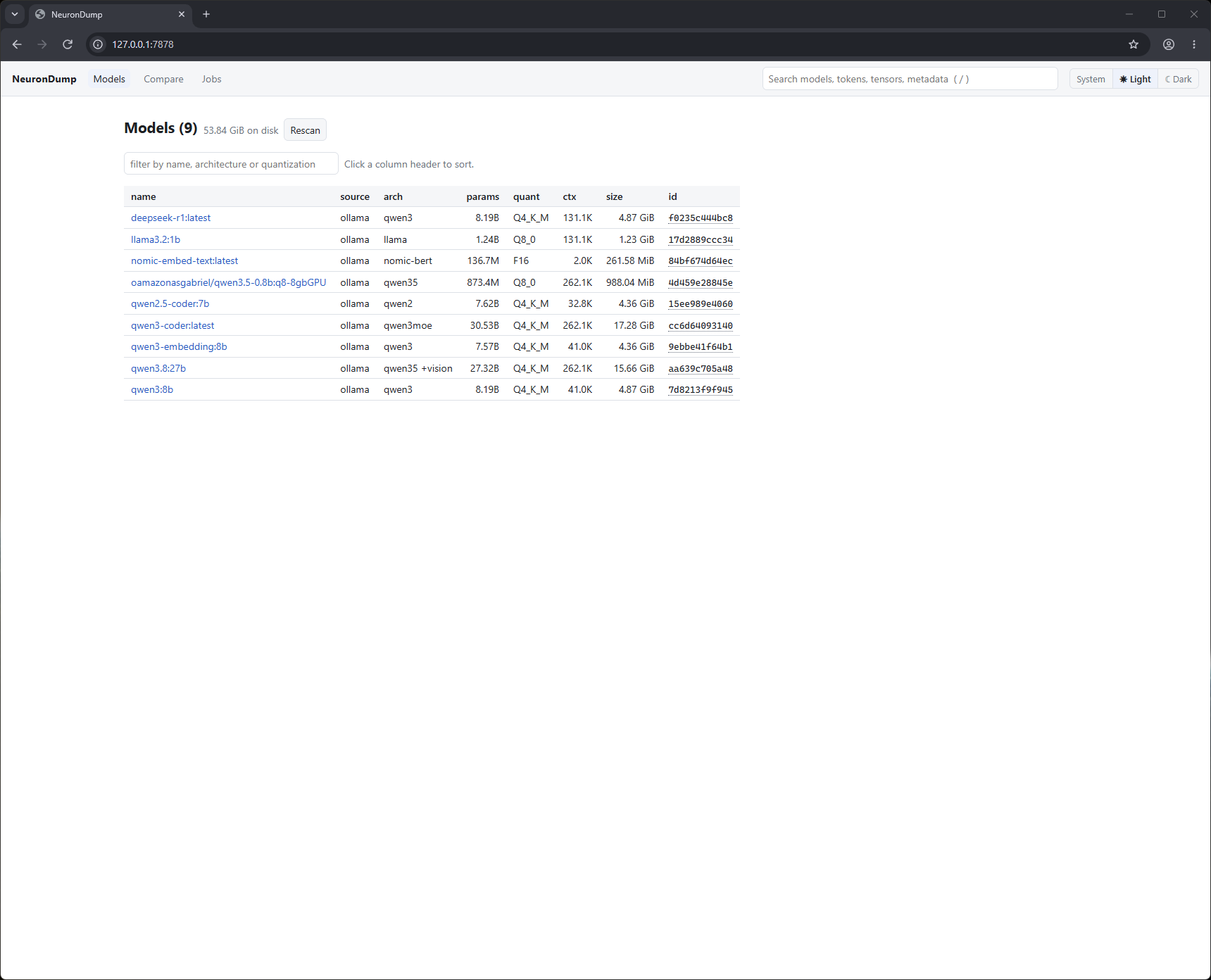
Pages
| Page | What you see |
|---|---|
| Models | every local model, total disk size, filter box, sortable columns; Rescan |
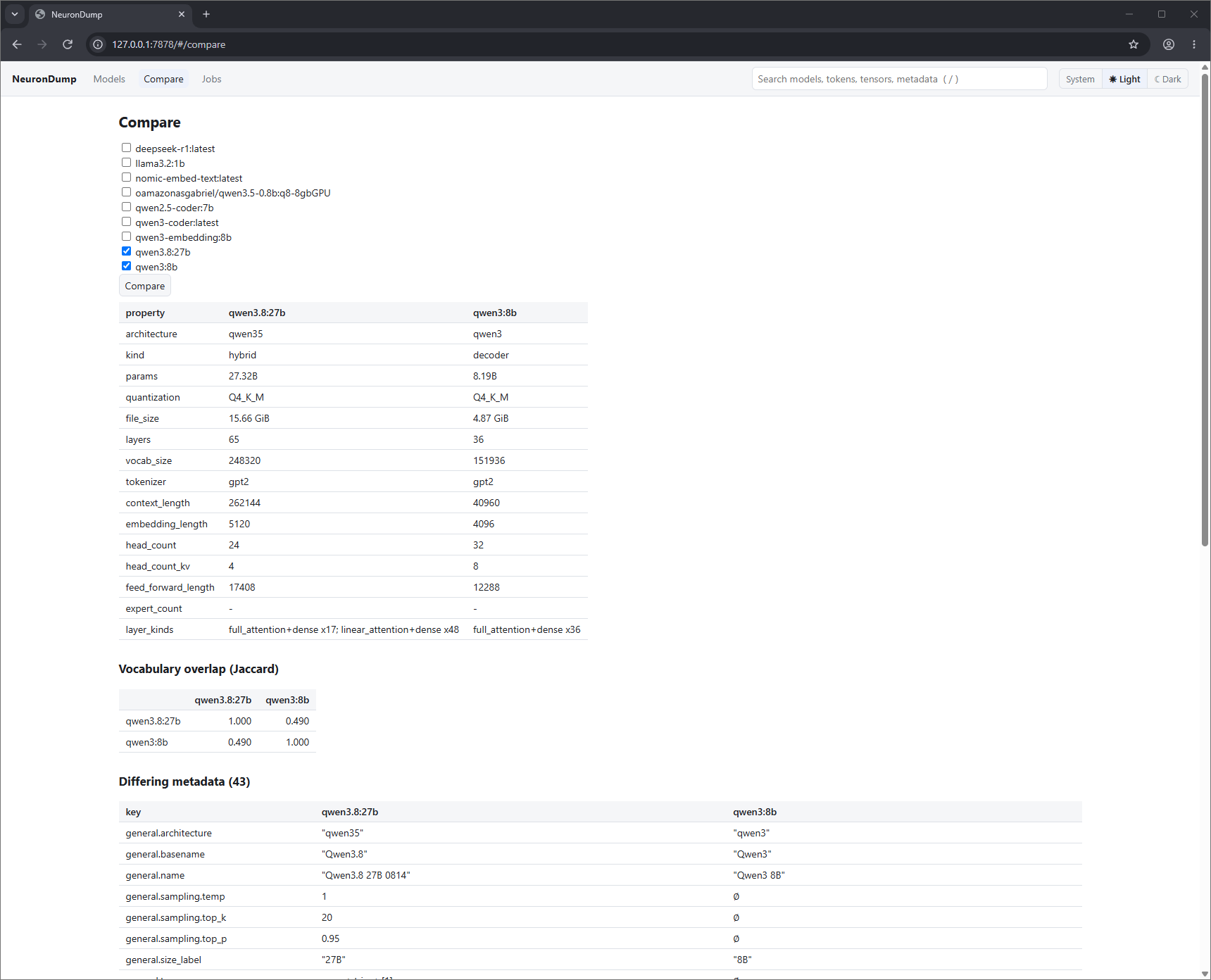
| Compare | two or more models side by side, vocabulary overlap, differing metadata |
| Jobs | running and finished jobs, live progress, cancel, results |
| model › overview | summary cards, architecture, sizes, tokenizer, special tokens, Ollama settings, warnings, searchable metadata, export links |
| model › vocab | search the vocabulary, filter by class / language, page through 100k+ tokens |
| model › tensors | filter and sort tensors; click one for its statistics |
| model › layers | a colored map of the layers (attention, linear, MoE) |
| model › graph | the model as a 2D or 3D graph: open, inspect, search, cut, edit, simulate, sweep, token flow (below) |
| model › tokens | tokenization, the templated prompt, per-token embedding info, the 3D embedding map (below) |
| model › journey | one token through the layers: logit lens, attention, FFN, decision breakdown (below) |
| model › timeline | generation step by step, with probabilities, entropy, alternatives (below) |
| model › edits | the full edit page: stack, add, snapshots, compare, bake (below) |
| model › template | the chat template as a collapsible tree |
| model › stats | statistics and histogram for one tensor, or the whole model as a job |
| model › analyze | run an analysis, tick the candidates you want, press Slim |
| model › trace | run a prompt and see each layer's prediction |
The Edits button in the header opens the edit panel as a drawer on every model page. It shows the number of active edits and turns orange when the model is edited.
journey, timeline, compare (and trace, simulate, sweep) need a build with --features trace and a
supported architecture; other models show the reason and keep the static pages.
Graph
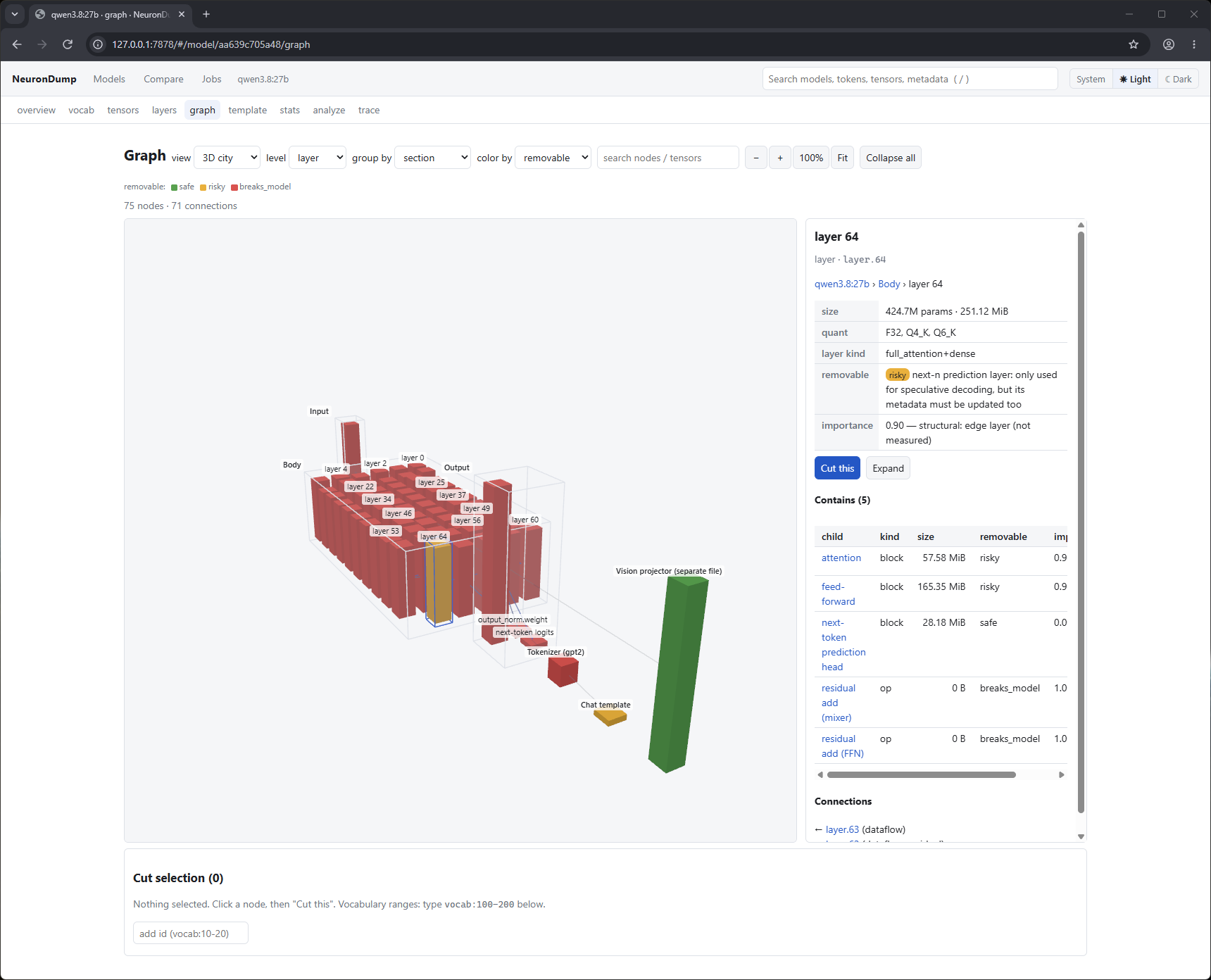
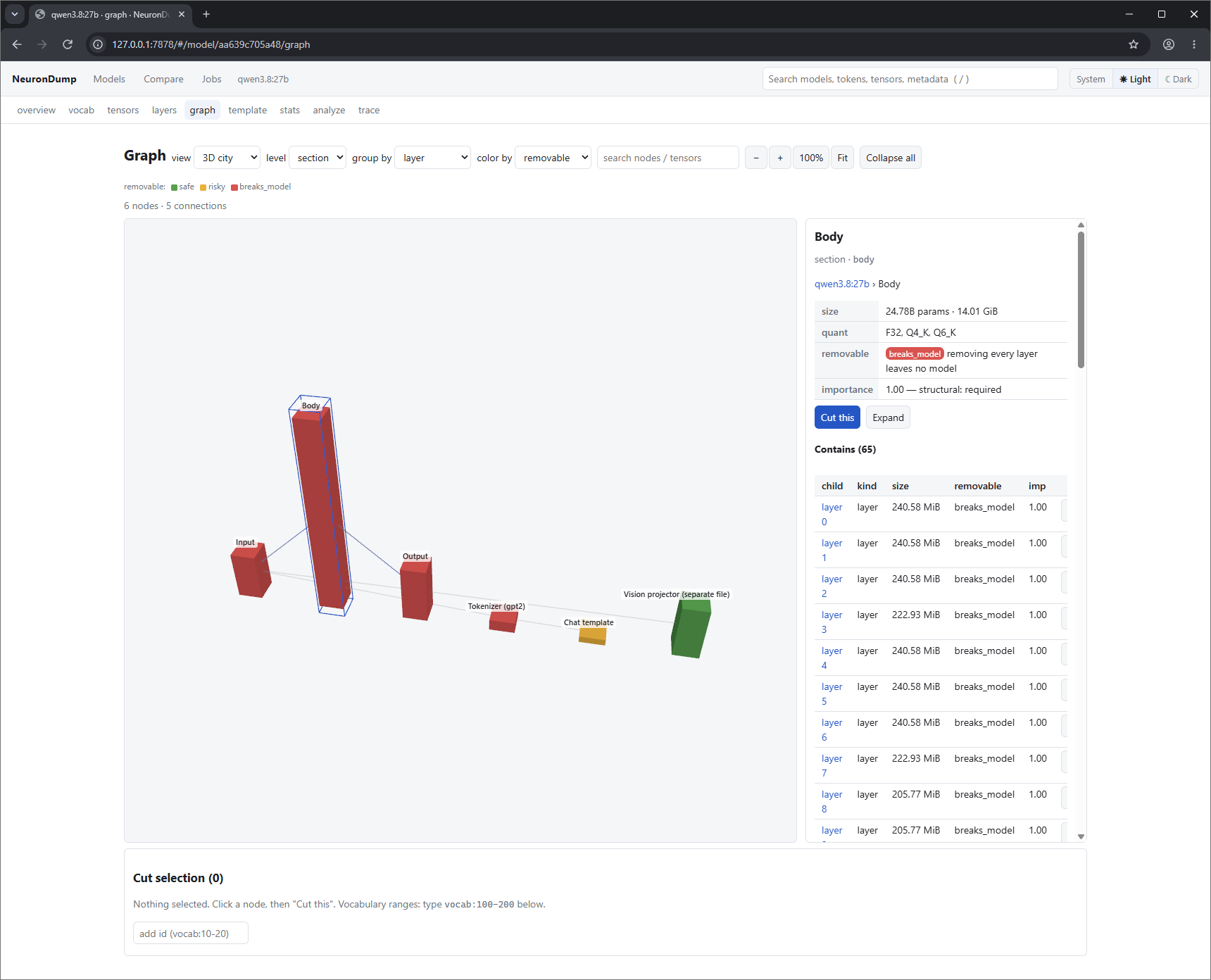
- 2D / 3D toggle; in 3D a layout menu: dataflow (default), tower, city, force. The badge
next to it shows the renderer backend:
WebGPU,WebGPU (software)orWebGL 2. See 3D graph. - level (section, layer, block, tensor), group by (section, layer, block, quant, kind, importance), color by (removable, section, kind, quant, importance, damage, flow).
- Click a node for the side panel (path, size, removable flag, importance, stats, activation, contents, connections). Double-click (or Expand) opens it: layer → blocks → KV groups → heads; FFN → neuron buckets; MoE → experts. Focus flies the camera to it.
- Search (Enter) highlights and flies to matches; hidden tensors open their parents.
- Edit: buttons in the side panel push an edit for that node (zero, ×0.5, ×2, any factor, skip layer). Changed nodes get an orange outline in 2D and 3D.
- Cut this builds a cut selection with the live static impact; Simulate runs it in memory, Apply as edit puts it on the edit stack, Sweep ranks layers or heads by damage, Save as plan → Slim writes a smaller GGUF. See Graph and ablation.
- ▶ token flow (3D dataflow): particles follow the last journey's token up the layers, which glow with their push on the prediction. clear path removes the purple token-path highlight that a journey's Show path in the graph adds.
Tokens
- Type a text, optionally tick chat template (and a system prompt) and press Tokenize.
- With the template, the full templated prompt is shown with your text highlighted, so you see every token the template adds.
- Token chips: border color = token class, dimmed = added by the template or tokenizer, bold =
special. A table lists id, text, class, the norm of the token's
token_embdrow, whether the model can predict it (yes,no, orbannedby an edit) and its nearest tokens by cosine. - Click a chip for details and actions: journey of this token, show on map, ban, boost +5, embedding ×0 (the last three add edits).
- Embedding map: Load embedding map draws the vocabulary in 3D (PCA of
token_embd). Colors are token classes (toggle each class in the legend), your tokens are enlarged and joined in order, search highlights matches, click a point to inspect it (and append it to the text).
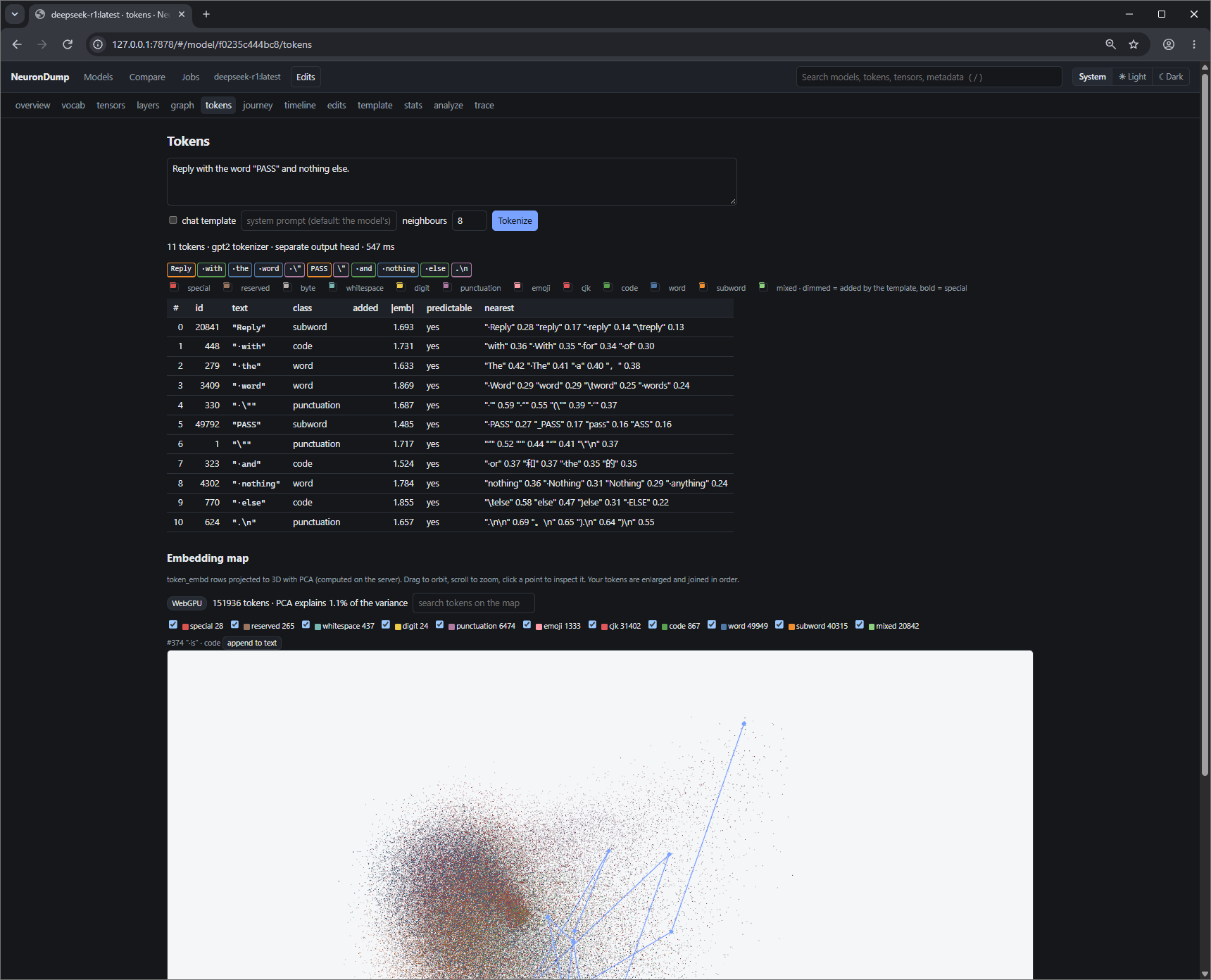
deepseek-r1 splits the prompt into 11 tokens; "PASS" is one token whose nearest rows are "·PASS",
"_PASS" and "pass". On the map (151,936 tokens, WebGPU) the prompt's tokens are joined in order.
Journey
Pick a prompt and a token index (-1 = last; click any chip to switch) and press Follow token.
- Layer by layer: residual-stream norm, logit lens top 3 (what the model "thinks" at that layer), probability and rank of the final prediction, the earlier tokens it attends to most, the most active FFN neuron buckets. Above the table: the layer where the prediction first becomes top-1 and top-5.
- Attention: a heatmap of layers × earlier tokens (mean over heads); click a layer for its heads × tokens heatmap. Heads with the largest push on the decision are outlined in purple.
- Decision breakdown: final candidates with probabilities, then direct logit attribution: how
much each layer's attention and FFN pushed the chosen token against the runner-up, the top heads
and top neurons (each with a zero button that adds an edit).
attributedis computed in exact f32 from the recorded activations; the model's own logits come from quantized matmuls (candle also quantizes the activations to 8 bits), so on quantized models the two can differ by a few tenths of a logit, which matters when the chosen token and the runner-up are close. - Show path in the graph highlights the contributing layers, blocks, heads and buckets in the 2D and 3D graph and sets the token for token flow.
- Runs with the current edits; tick baseline to ignore them. MoE routing and SSM state are not measured (no forward pass for those architectures).
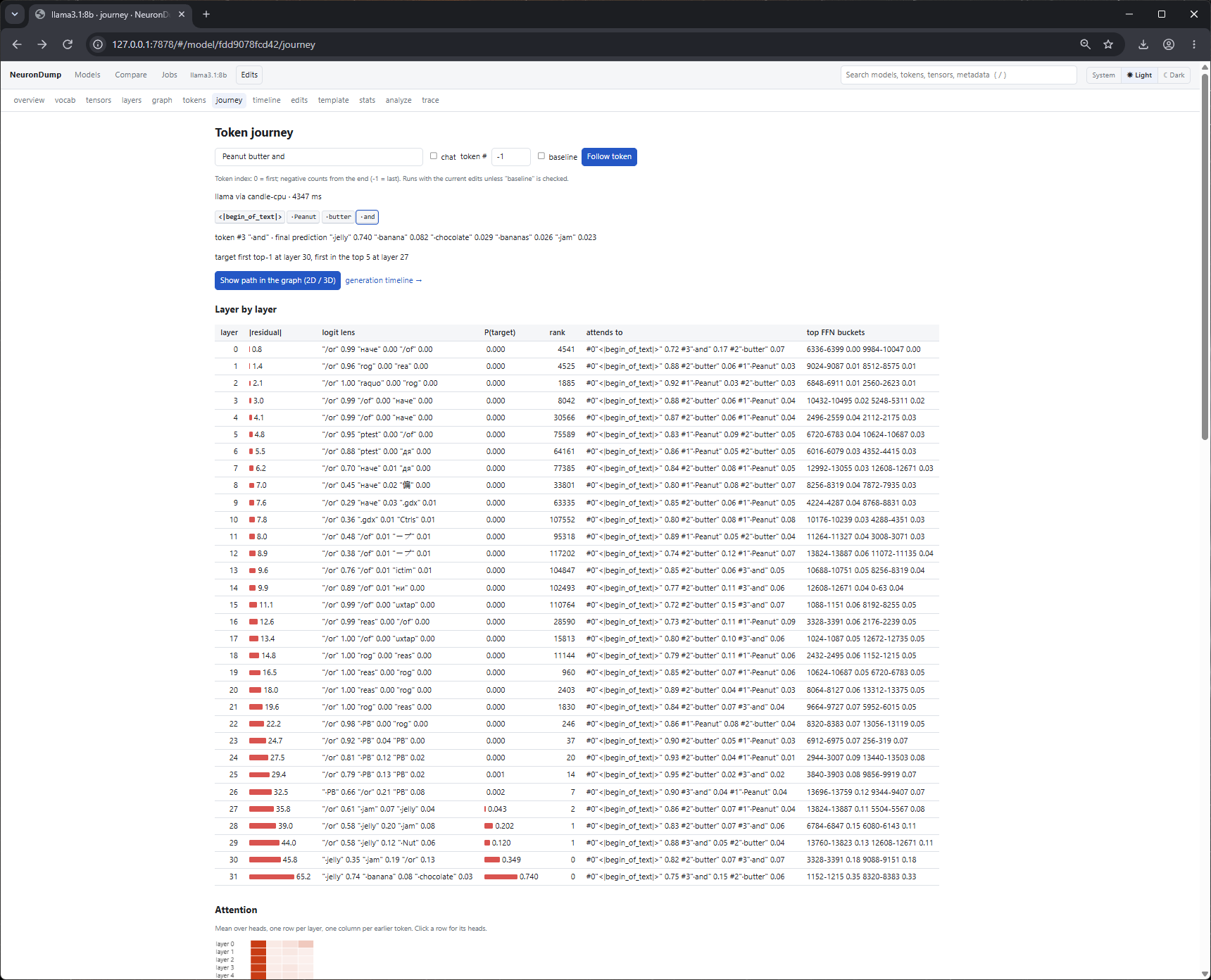
The final prediction is " jelly" 0.740 (then " banana" 0.082, " chocolate" 0.029); it is first
in the top 5 at layer 27 and top-1 at layer 30. Up to layer 29 the logit lens reads "and" as
grammar ("/or", as in "and/or"); " PB" shows up from layer 22, and only the last two layers
switch to the food.
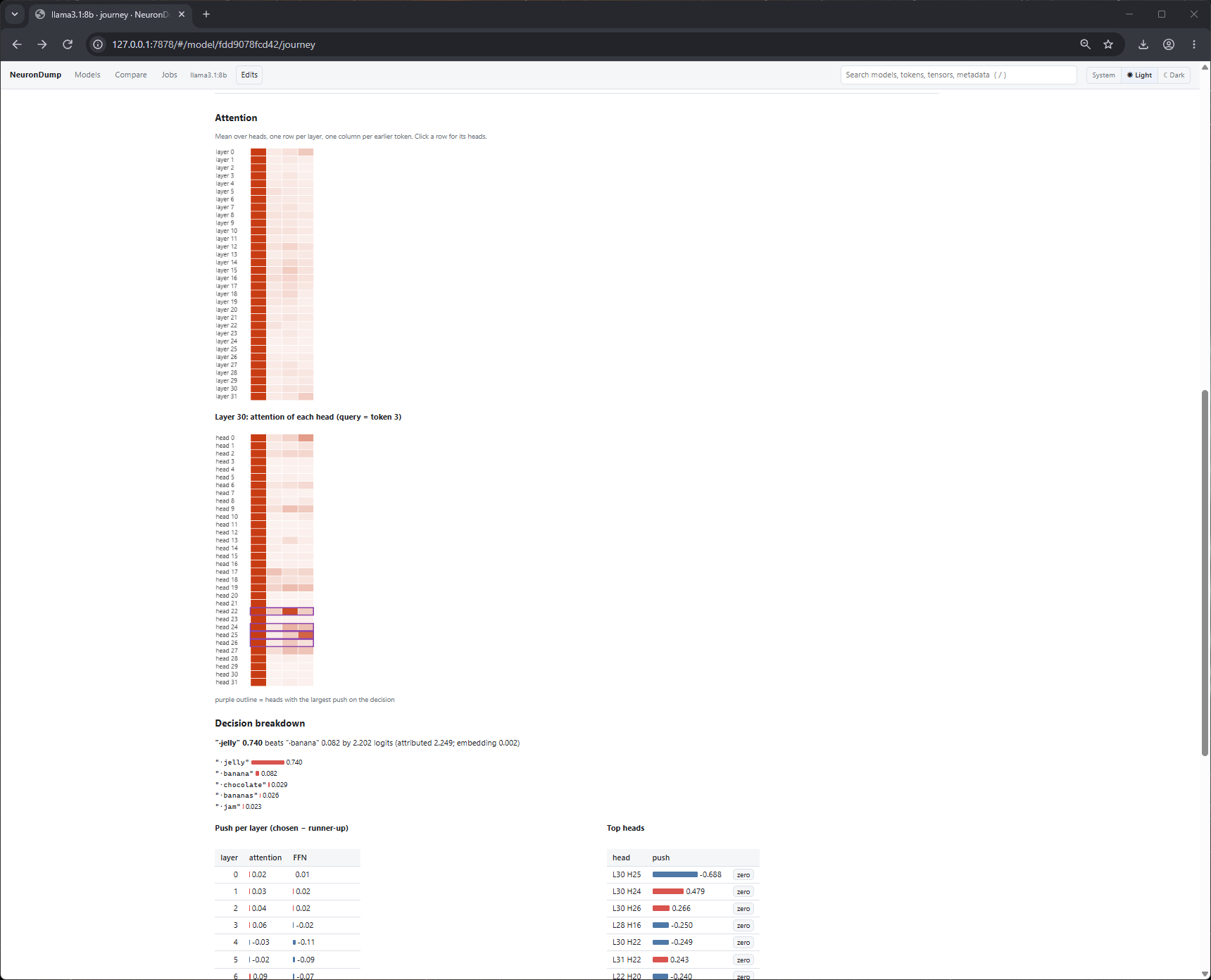
The heatmaps: every layer attends mostly to <|begin_of_text|> (an attention sink); in layer 30,
heads 22, 24, 25 and 26 (outlined) push the decision most. The breakdown: " jelly" beats
" banana" by 2.202 logits; head 25 of layer 30 pushes against it (−0.688), head 24 for it (+0.479).
Timeline
Generate N tokens (greedy, or with temperature / top-k / top-p / seed). Each step is a card with the
chosen token, its probability and the distribution's entropy as small bars, and the top alternative;
forced tokens (from a force edit) have an orange border. A table lists the same. Click a step
for its decision breakdown (computed on demand, or instantly with explain).
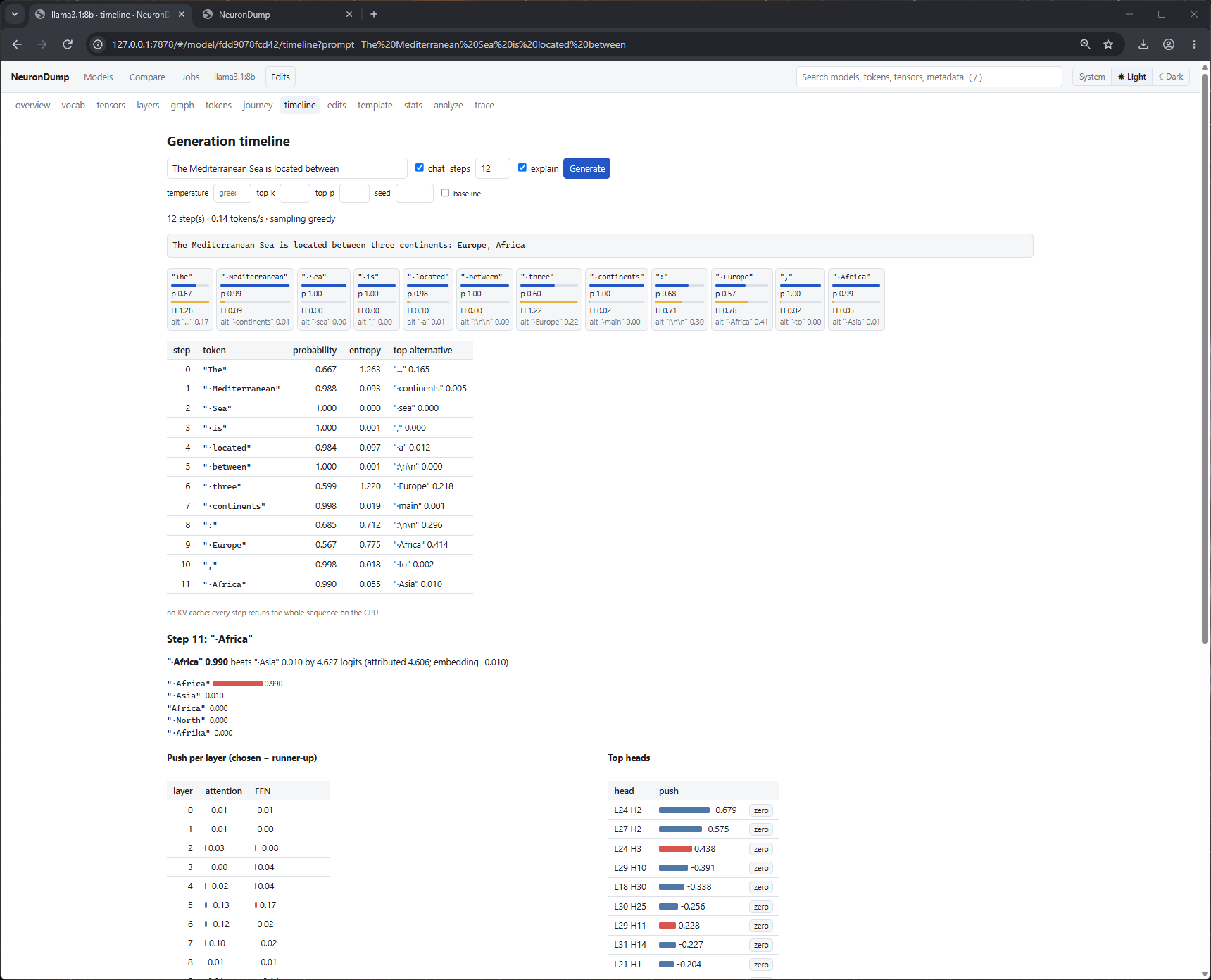
llama3.1:8b on "The Mediterranean Sea is located between" (chat, 12 steps, explain). The two
uncertain steps stand out by their entropy bar: " three" 0.599 against " Europe" 0.218, then
" Europe" 0.567 against " Africa" 0.414. Step 11 is open: " Africa" 0.990 beats " Asia" by
4.627 logits, with the push per layer and the top heads (L24 H2 first).
Edits
The edit panel (drawer or full page):
- Stack: every edit with an on/off checkbox and ×; ↶ undo, ↷ redo, restore all (back to the original model, undoable). Changed node ids and notes are listed.
- Add: scale / zero a node, skip a layer, ablation cut, ban / boost a token, embedding row edit,
steering vector (two prompts + strength), activation patching (layer, optional head, source prompt),
sampling, forced token, system prompt, chat template. Tokens can be typed as text or
#id. - Snapshots: save the stack under a name, load it back; export edits.json / import.
- Before / after: a prompt, generated tokens and an optional corpus; Compare runs baseline vs edited: generated text side by side, top-k, KL, top-1 change, perplexity on the corpus, the logit lens of both, and how the decision breakdown changed per layer.
- Bake: writes the edits into a new GGUF in
~/neurondump/bake/with a Modelfile, and prints theollama createcommand.
See Interventions for what every edit does.
Jobs
Long work (stats, analyze, slim, trace, ablate, sweep, journey, generate, compare, bake) runs as a
job, so the page stays usable. A number next to Jobs in the header counts the running ones.
Each job shows live progress and can be cancelled; results of deterministic jobs are cached
((cached) in the progress line).
Other screenshots
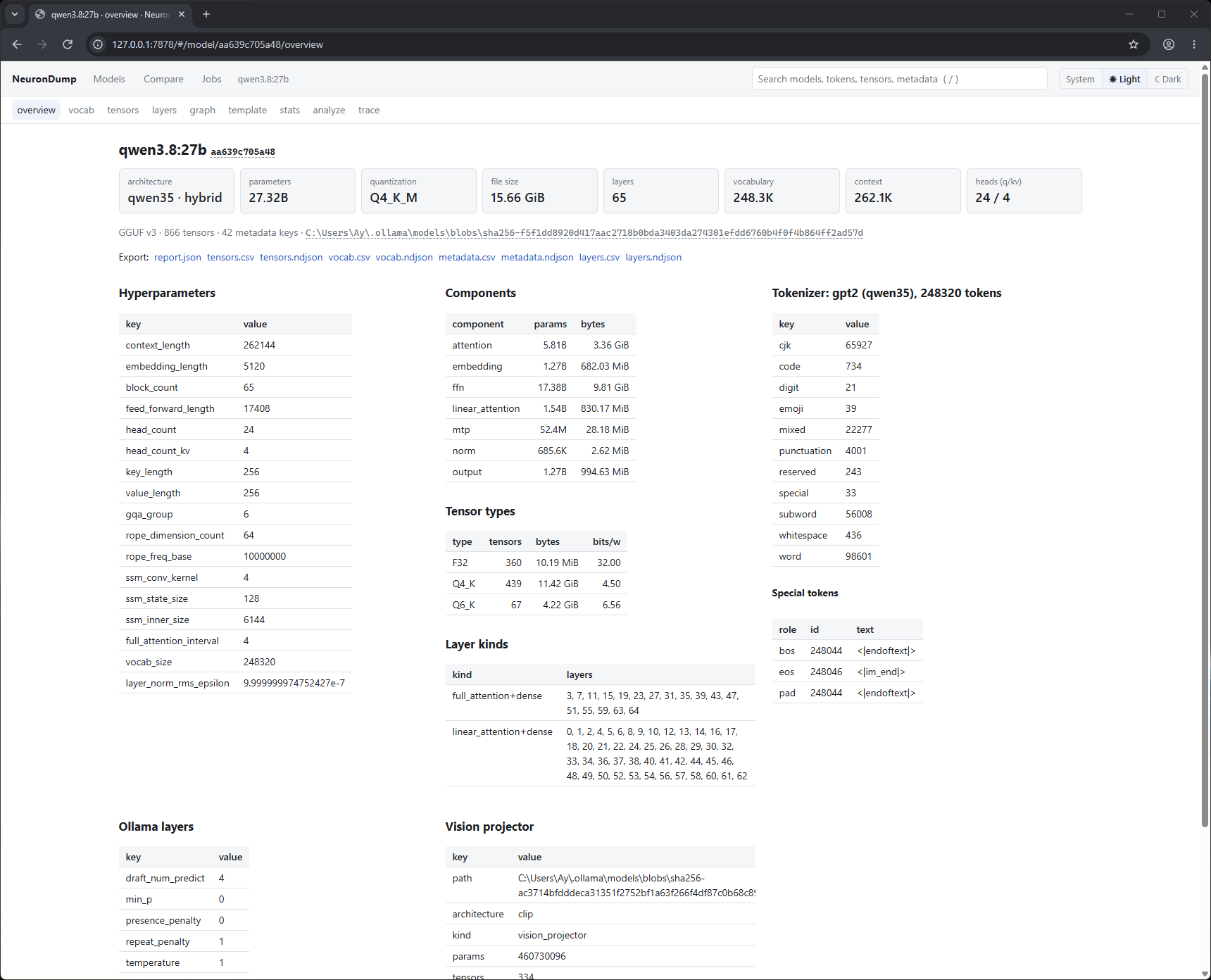
Overview of qwen3.8:27b: summary cards, hyperparameters, components, tensor types, layer kinds, tokenizer, Ollama settings and the vision projector.
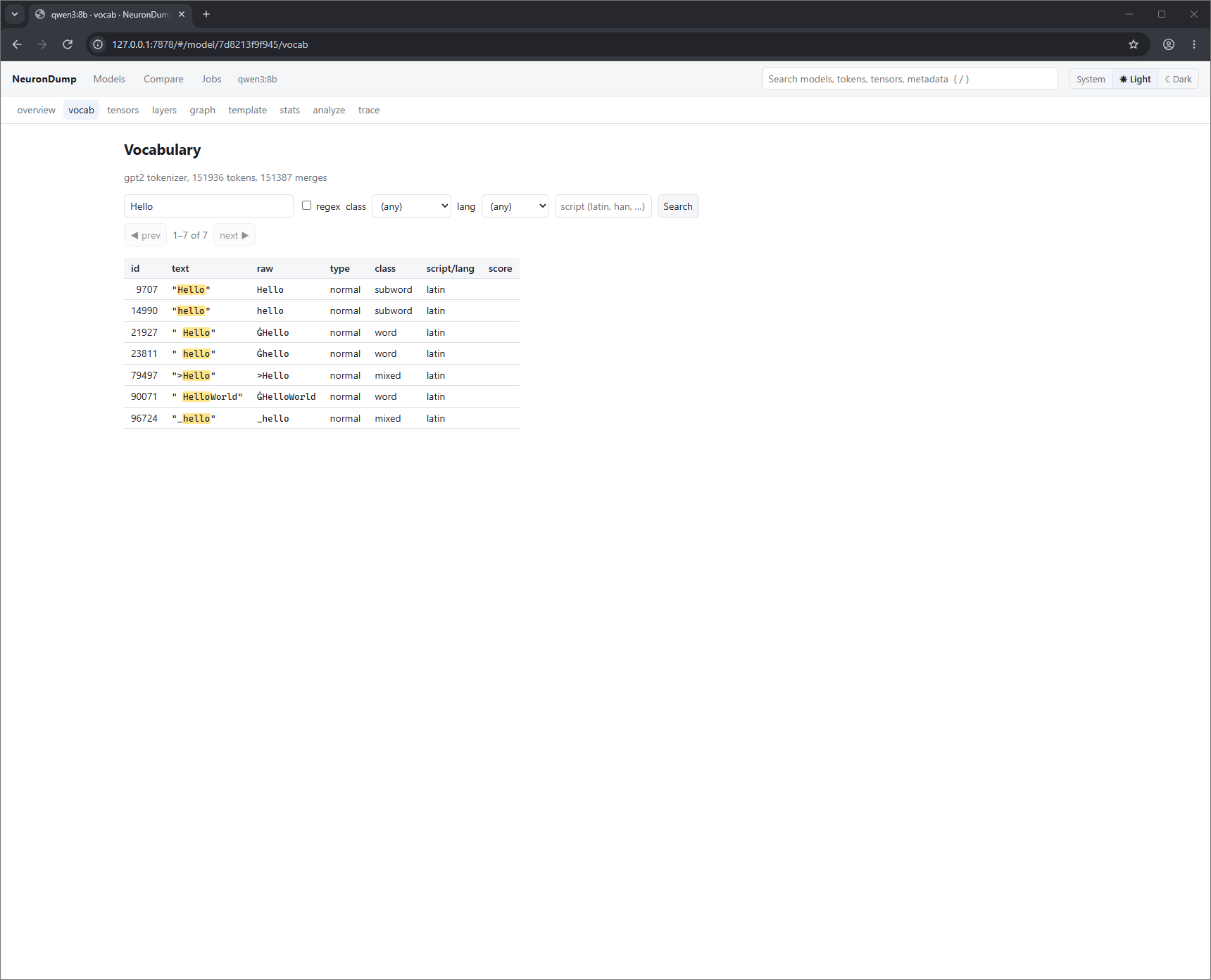
vocab: searching qwen3:8b's 151,936 tokens for "Hello", with matches highlighted.
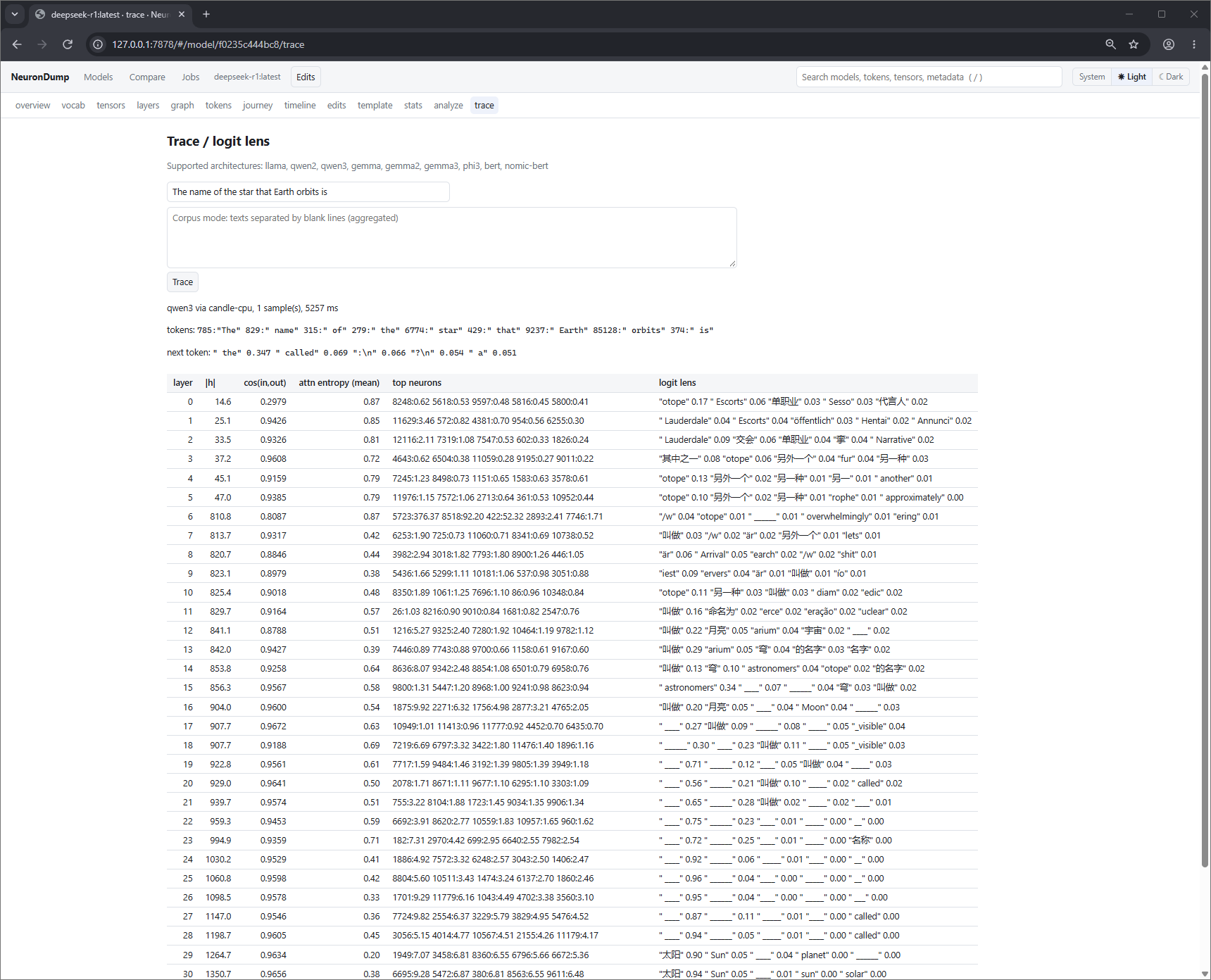
trace: deepseek-r1 on "The name of the star that Earth orbits is". The last column is the logit lens: the answer appears at layer 29 ("太阳", then " Sun").
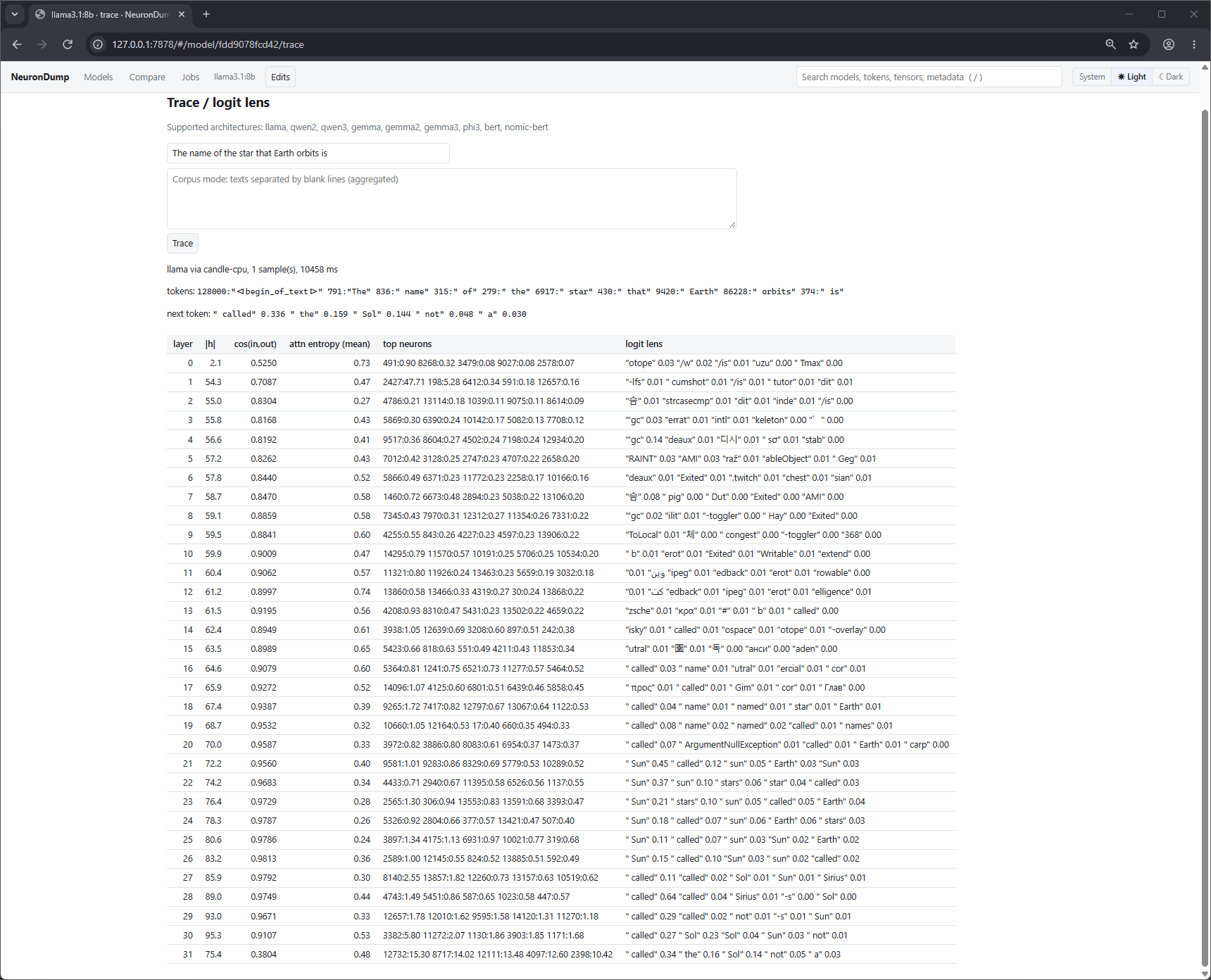
trace: llama3.1:8b on the same prompt. " Sun" is top-1 from layer 21 to 26, then " called"
takes over; the next token is " called" 0.336, " the" 0.159, " Sol" 0.144.
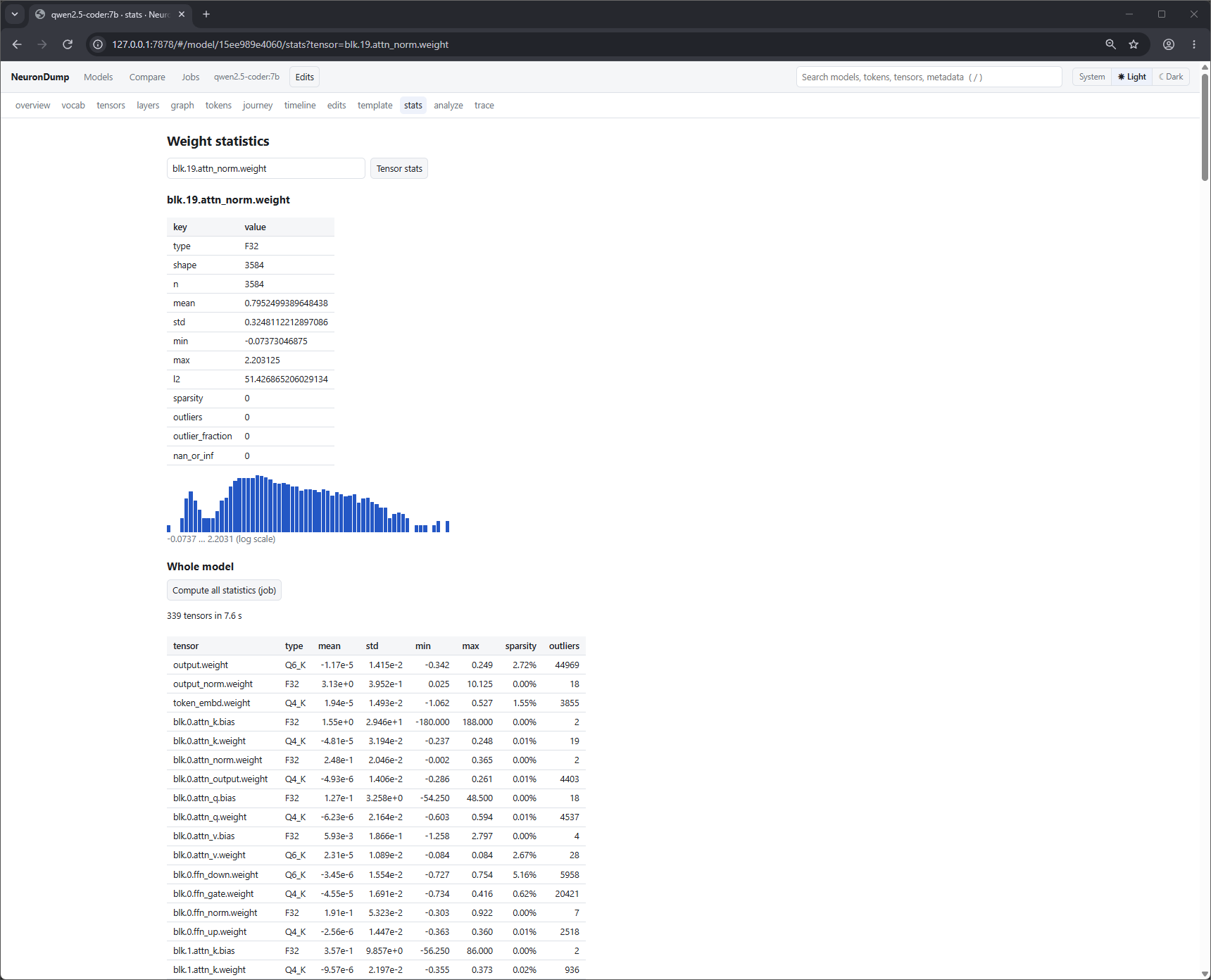
stats: qwen2.5-coder:7b, one tensor (blk.19.attn_norm.weight: 3,584 F32 values, mean 0.795,
histogram on a log scale) and the whole model as a job (339 tensors in 7.6 s). The attention biases
of layer 0 stand out: blk.0.attn_k.bias goes from −180 to 188.
Compare: qwen3.8:27b next to qwen3:8b.
Search and shortcuts
- The search box in the header finds models by name, architecture or quantization; with a model open it also searches that model's tokens, tensors and metadata keys.
- / jumps to the search box, Esc leaves it.
- Click a column header to sort; click an id, name or path in
codestyle to copy it. - System / Light / Dark sets the theme (System follows the OS).
Safety
- It listens on
127.0.0.1only.--host 0.0.0.0makes it reachable from your network and prints a warning; avoid that on shared networks. Remote browsers then use WebGL 2 (WebGPU needs a secure context, see 3D graph). - Every API call needs the session token.
- Models are referred to by id, never by file path. Slim and bake outputs are plain file names
written under the output folder (
~/neurondump/slim/,~/neurondump/bake/).
The HTTP API is documented in API.